Corporate websites& standalone sites

Help visitors understand your business—
and give them a clear way to start a conversation.

Make your business clear.
Give every visit a next step.

  • Corporate website design illustration

    Corporate websites

    Connect your company, products, services, real work and contact paths in a new corporate website or redesign.
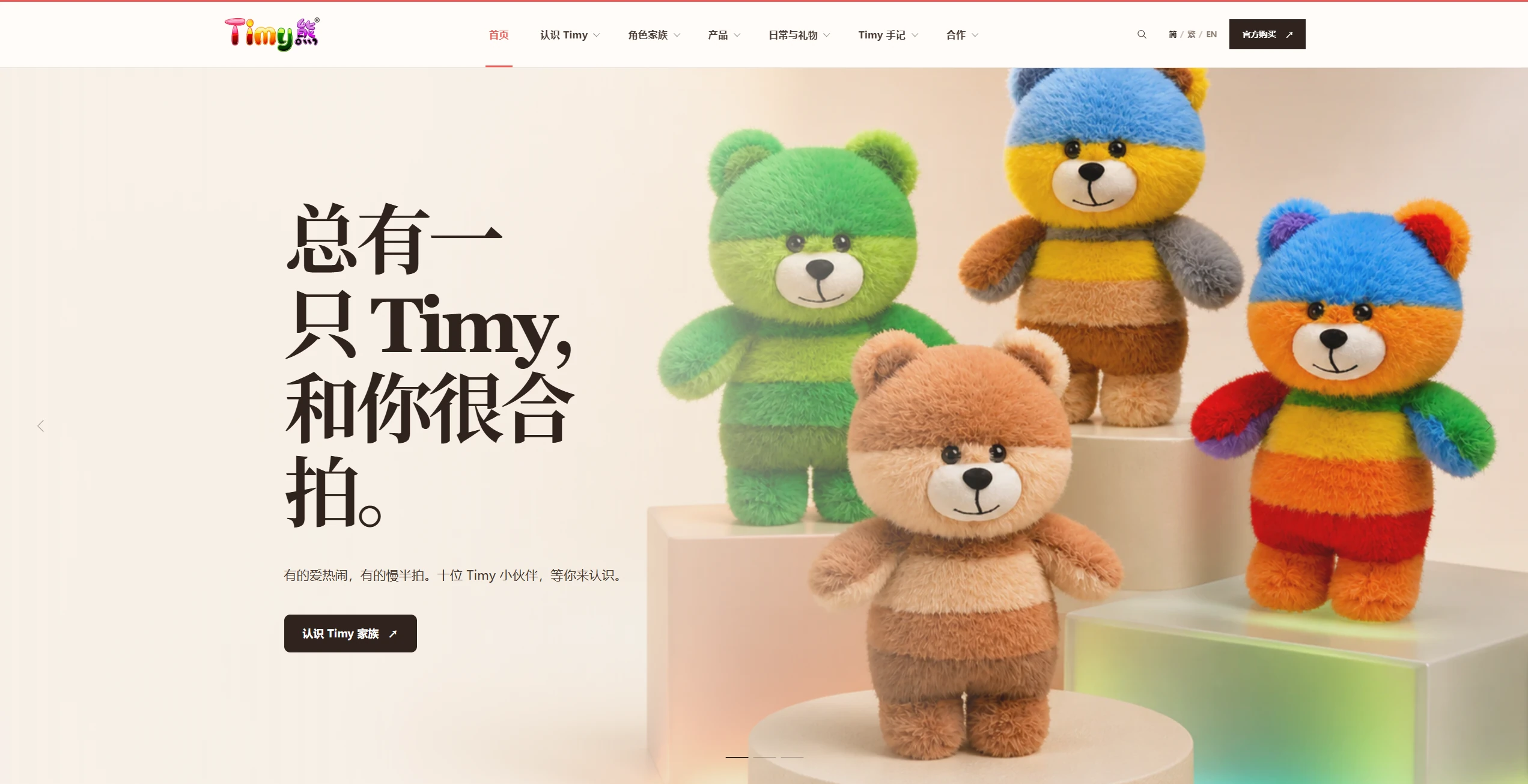
  • TimyBear website

    Brand websites

    Shape the content and visuals around your positioning and products, with a first impression grounded in what you do.
  • Historical MiyoTrip website

    Standalone sites

    Plan languages, product pages and inquiry channels around your target markets and how the site will be maintained.
  • Start with the questions customers ask. Turn your company, product and project materials into a clear page and content plan.
    Requirements
    Site structure
    Content planning
    Contact routes
  • Design the visuals, reading order and interaction feedback together, from navigation to inquiry forms, including the mobile experience.
    Page prototypes
    Visual design
    Interaction design
    Device adaptation
  • Build the agreed pages and interactions into a working site, including presentation, forms and the functions defined in the scope.
    Frontend development
    Feature development
    Responsive pages
    Feature checks
  • Define which content the team can update, which languages to support and how forms connect with the tools you already use.
    Content backend
    Multiple languages
    Access permissions
    Integrations
  • Review existing URLs and articles, search information, internal links, language relationships and inquiry delivery before launch.
    Page information
    Internal links
    Launch review
    Content handover
Website content & search

Make content easier to understand

Put customer questions into the content, with a structure your team can understand and maintain.

Put the important information first

Explain what you do and who it is for, then support the decision with products, services and real project information.

Make each page clear

Keep titles, content and actions aligned, with useful connections between existing articles and relevant services.

Make updates manageable

Agree how articles, products and recurring information will be updated, including the content areas, permissions and instructions.

Where is your website today?

Website checklist

A new site, a redesign and ongoing improvements have different starting points. Choose the next scope around your materials and goals.

Building a new website

Bring your company introduction, services and reference sites. Start with the audience, page list and ways to get in touch.


Refreshing an existing website

Inventory old pages, articles and downloads. Decide what stays and what changes, then map the visitor paths after the redesign.

Continuing to improve

Start with a point of friction: hard-to-find content, awkward mobile interactions or unclear contact options can become specific tasks.


From an idea to a live website

Work through each step, then build what we have agreed.
  • First conversation

    Discuss your audience, key services and inquiry goals. Use your current website and materials as the starting point.
    Focus at this stage
    Business backgroundProject goals

First conversation

Discuss your audience, key services and inquiry goals. Use your current website and materials as the starting point.
Focus at this stage
Business backgroundProject goals

Requirements planning

Build a page, content, CMS and feature list, separating the essentials for this release from later additions.
Focus at this stage
Pages & contentFeature scope

Page design

Use page prototypes to agree the information flow and contact journey before refining the visual design and interactions.
Focus at this stage
Page structureVisuals & interaction

Website development

Implement the approved designs and functions, adding the agreed content management and forms.
Focus at this stage
Page developmentFeature development

Testing & review

Check navigation, readability, forms, language switching and key pages on the agreed devices, then record and address issues.
Focus at this stage
Feature checksDevice checks

Deployment & launch

Confirm the domain, hosting, old URL destinations and inquiry delivery, with an agreed switch-over and rollback plan.
Focus at this stage
Launch preparationDeployment checks

Handover & support

Hand over CMS access, update instructions and the delivery list, with clear arrangements for maintenance and further changes.
Focus at this stage
Materials handoverOngoing support
Questions

Website developmentCommon questions

  • Yes. Review existing URLs, articles, images and downloads first. Keep suitable addresses and map the destination of each page that needs to move.
  • Page types, content readiness, languages, CMS functions and integrations all affect the scope. We establish a delivery list before estimating cost and timing.
  • They can be included. First define the editable content areas, languages, editors and reviewers, then agree the CMS scope and publication process.
  • We agree the main devices and check navigation, text, images and forms. Specific devices or browsers should be identified at the start.
  • Inventory the old URLs, keep suitable ones and map changes to the right new pages. Check internal links and the sitemap, then monitor search performance after launch.
  • List the articles, products or information you want to maintain. The handover covers editing permissions, publication steps and how design or feature changes will be handled.

Let's talk about your project

Websites / Business systems / AI applications

Chat on WhatsApp