
Key takeaway
Git only backs up code templates, not live data. Recovery requires four separate assets: source code (Git), runtime database records (never in Git), uploaded media (persistent storage), and secrets (stored apart). Capture synced snapshots, verify integrity, and restore into a new private directory first.
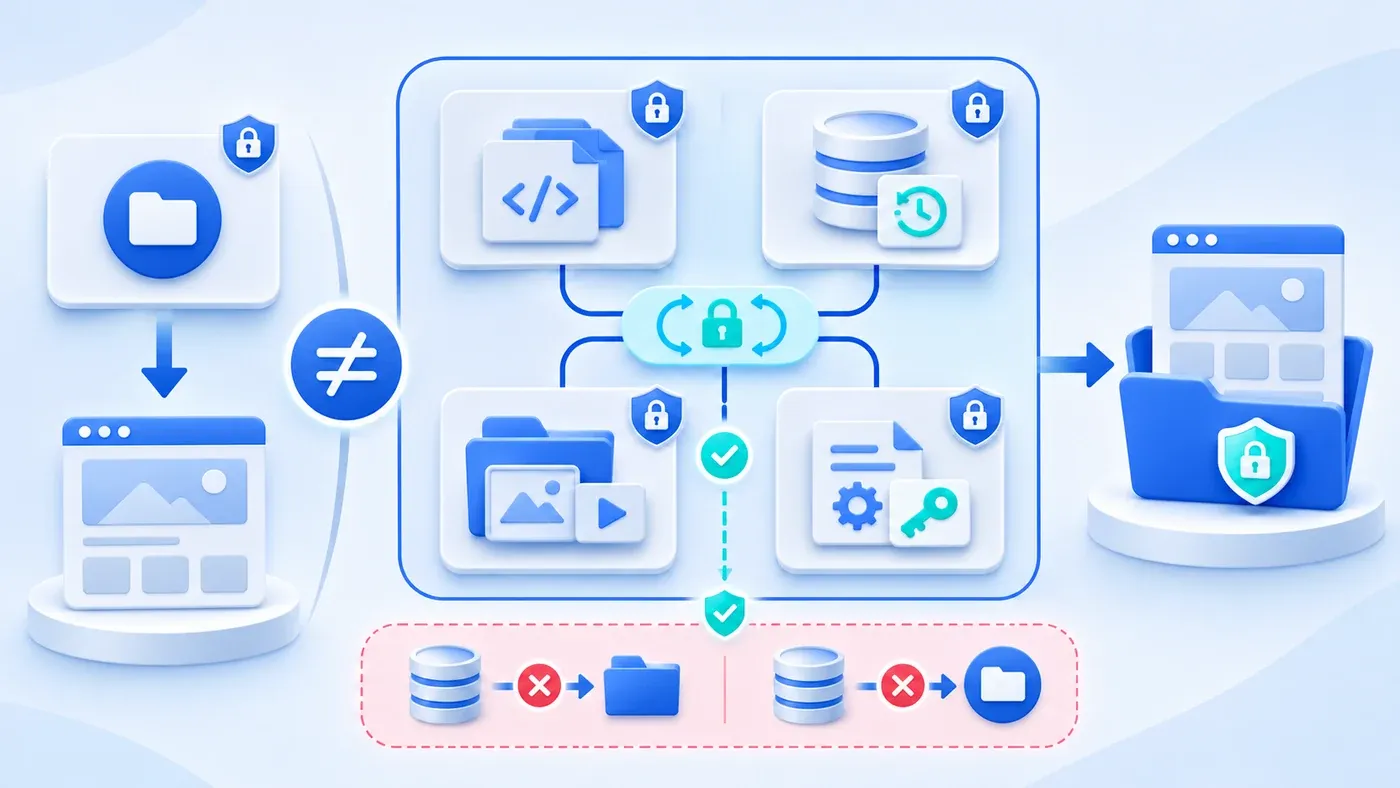
When business owners or technical leads talk about website resilience, one assumption surfaces often: "Our code is safely in Git—if the server breaks, can't we just pull the repo and redeploy?"
No. Git holds your website's code shell, not your live site. If a disk fails or a server needs rebuilding, pulling your Git repository restores empty templates—zero articles, zero uploaded visuals, zero admin logins, and zero inquiry leads. Real website recovery requires separating source code and templates, runtime database records, uploaded media files, and environment secrets into four distinct assets, capturing synchronized snapshots inside a stop-write window, verifying integrity, and restoring into a brand-new private directory before switching live traffic.
Why "Our Code Is in Git" Leaves Your Live Site Vulnerable
Treating a Git repo as a full website backup confuses build-time code with runtime state.
Consider a hypothetical scenario: an industrial equipment company prepares to move its website to a new host. Its templates sit cleanly in Git. Meanwhile, the team exports a database copy on Monday night and copies the uploads folder on Tuesday afternoon. On Tuesday morning, marketing publishes a new article with three factory photos, and two prospective buyers submit inquiries. Redeploying from Git alone wipes every article, login, and lead. Pairing Monday's database with Tuesday's uploads drops Tuesday's article—while pairing a newer database with older uploads leaves broken images everywhere because database rows reference missing files.
This article focuses specifically on backup separation and disaster recovery, distinct from CDN caching layers, routine content vs. dev maintenance splits, and in-app single-record undo workflows.
Separating the Four Distinct Website Asset Classes
In a modern CMS setup (such as Next.js and Node.js backed by SQLite and local uploads), clean recovery depends on four assets with opposing storage rules:
- Source Code and Templates (Managed in Git) Routing, layout templates, styles, scripts, schema migrations, and lockfiles belong in Git, where commits handle code rollbacks. Code defines how the site works—not what editors or visitors wrote after launch.
- Runtime Database Records (Must Never Enter Git) Articles, page copy, categories, admin password hashes, and private consultation leads change constantly and must never be committed to Git. Binary database diffs bloat history, admin hashes and buyer contacts persist across every clone, and any Git deploy or rollback risks overwriting recent inquiries with old snapshots.
- Runtime Uploaded Media Directory (Persistent Disk Outside Code Builds) Photos, generated thumbnails, Open Graph share images, and PDF brochures uploaded after launch are not build artifacts. They require a persistent directory (such as a volume set via
WEBSITE_UPLOAD_DIR) or isolated storage outside app builds so deploys never wipe live files. - Environment Secrets and Domain Config (Stored Separately from Snapshots)
.envvariables, signing keys (PAYLOAD_SECRET),SERVER_URL, and storage pointers must stay separate from database and media snapshots. Bundling your signing secret inside the same archive as your database exposes both private records and the key needed to forge sessions if that archive leaks.
Two Hidden Backup Traps: DB–Media Desync and Exposed Snapshots
Even teams backing up beyond Git often run into two technical failures.
Trap 1: Unsynchronized Copies and Partial Checks Break Images
Copying a live database file with standard OS copy tools is unreliable. Per Using the SQLite Online Backup API, external copying under a shared lock blocks writers for the entire transfer, misses in-memory databases, and risks corruption if power or the OS fails mid-copy. SQLite's Online Backup API (alongside VACUUM INTO and sqlite3_rsync) copies pages incrementally into a bit-wise consistent snapshot—automatically restarting if external writes occur mid-backup. In Node.js, the Node.js SQLite (node:sqlite) documentation wraps this via sqlite.backup(sourceDb, path[, options]), supporting batch rates (rate) and progress callbacks (progress).
Even then, a consistent database alone fails if uploads drift in time. Media tables store filenames pointing to files on disk; capturing DB and uploads separately leaves broken images. Verification also carries a subtle catch: per the SQLite PRAGMA documentation, PRAGMA integrity_check verifies B-tree layout, indexes, and constraints (returning 'ok') but does not check foreign key errors—you must run PRAGMA foreign_key_check separately. Because SQL commands cannot inspect disk folders either, your snapshot check must match every DB-referenced media filename against a disk manifest with SHA-256 checksums.
Trap 2: Placing Snapshots in public/ or Git Leaks Leads and Hashes
Dropping a .db dump or snapshot zip into public/ for easy transfer, or committing it to Git, exposes admin password hashes, unpublished drafts, and customer inquiries over public URLs or permanent Git history. Store snapshots strictly in an access-restricted private path outside public/ and the live uploads folder.
Five Safe Recovery Principles: Restore Into a New Directory
- Agree a write-free window
- Capture data and media
- Check integrity and references
- Restore and verify in a new location
During recovery or drills, never extract backups over active runtime files—if the snapshot is flawed, overwriting destroys the last salvageable live state. Follow five safeguards instead:
- Capture Inside a Stop-Write Window: Pause CMS edits and public writes so DB transactions and uploads freeze together. Use an online consistency API (
node:sqlitebackup()orVACUUM INTO) to write the DB snapshot into a fresh private folder outsideuploads/, copy all media files, and log SHA-256 digests in a manifest. - Verify Checksums, Integrity, Foreign Keys, and Media Matches: Match every SHA-256 against the manifest; open the DB in
readOnlymode to verifyPRAGMA integrity_checkreturns'ok'andPRAGMA foreign_key_checkreturns zero rows; and confirm 100% of referenced media filenames exist in the manifest. - Restore Into a Brand-New Private Directory: Create a brand-new private target directory with restrictive permissions, copy the verified database and uploads there, and re-run checks. Keep the existing runtime folder untouched until cutover sign-off.
- Pair Separately Stored Secrets First: Load
.env(PAYLOAD_SECRET,SERVER_URL) from your isolated secret channel, pointDATABASE_URLandWEBSITE_UPLOAD_DIRto the new folder, and boot a verification instance. - Verify Four Checks Before Switching Traffic: Confirm
/api/healthreports healthy without leaking paths or counts; test admin login; check public bilingual pages and uploaded images for zero 404s; and confirm drafts and inquiries remain auth-gated. Building these handoff checks into setup aligns with our website delivery process.
Website Four-Asset Storage, Security Boundaries & Recovery Matrix
Asset Class | What It Holds | Storage (& Forbidden Zones) | Backup & Sync Rule | Restore & Verification Rule |
|---|---|---|---|---|
Source Code & Templates | Layouts, routes, styles, migrations | Git repository (never commit | Track via commits and release tags | Rebuild from pinned commit; Git rollbacks cannot recover content |
Runtime Database | Articles, pages, password hashes, leads | Private persistent disk (never in Git or | Online Backup API in stop-write window + SHA-256 | Check SHA-256, |
Uploaded Media | CMS originals, thumbnails, share images, PDFs | Dedicated persistent uploads folder (outside builds) | Copy in the same window as DB; hash every file | Verify file SHA-256 and 100% DB reference match |
Secrets & Config | | Separate secret store (isolated from snapshots & Git) | Back up separately from snapshot archives | Pair secrets with new paths; test |
How This Site Separates Version History from Runtime Data
In this site's current project, Git tracks code, templates and source records for the assets in use. CMS articles, accounts and uploaded files live in a separate persistent data directory and are not restored by checking out the repository. Rebuilding the page code alone cannot bring back missing content and uploads.
The site's local deployment drill treats the database and uploads together and restores them into a new private directory. This makes the boundary between code history and runtime data explicit. It is a local drill, not production-server recovery acceptance or a promised recovery time.
Website Backup & Recovery Drill Verification Checklist
Use this checklist during handoff or quarterly drills (pair with our Website Project Preparation Checklist when inventorying domains and existing files):
[Website Backup & Recovery Drill Verification Checklist]

1. Four-Asset Separation & Security Red Lines
- [ ] Git tracks only code, templates, and migrations—no .env files, DB dumps, or leads in history
- [ ] Database and uploads sit on persistent storage outside ephemeral code build folders
- [ ] Snapshots stay in restricted private paths and never inside public/ static folders
- [ ] Signing secrets (e.g., PAYLOAD_SECRET) and .env config are stored separately from data snapshots

2. Synchronized Snapshot Capture & Integrity Checks
- [ ] Final snapshot runs inside a stop-write window so DB and uploads align in time
- [ ] DB capture uses an online consistency API (e.g., node:sqlite backup or VACUUM INTO), not raw file copies
- [ ] Snapshot manifest logs SHA-256 checksums for the database file and every uploaded media file
- [ ] Verified PRAGMA integrity_check ('ok'), PRAGMA foreign_key_check (0 rows), and 100% DB-to-file match

3. Isolated New-Directory Restore & Pre-Cutover QA
- [ ] Restore writes strictly into a brand-new private directory while keeping the old runtime folder untouched
- [ ] Separately stored secrets and new directory paths are paired and verified before startup
- [ ] /api/health reports healthy without leaking internal paths, credentials, or record counts
- [ ] Admin login, public bilingual pages/images, and auth-gated drafts/inquiries pass before switching traffic
Separating code, databases, media, and secrets turns recovery from emergency guesswork into a repeatable drill. If you are planning a website rebuild or launch handoff, review our Corporate Website & Standalone Site Services or bring your hosting and backup setup to our consultation page.
