
Key takeaway
Post-launch website maintenance has four tiers: CMS copy, articles, and media updates belong to content teams; security patches, LTS updates, SSL, and restore drills belong to technical ops; regressions on delivered features are bug fixes; new templates or tools require separate scoping.
Most website projects run smoothly up to launch day. Disputes usually surface two months later: marketing files a developer ticket just to change a phone number, or expects a new product calculator under a generic "one-year maintenance" agreement only to hear it requires a separate quote.
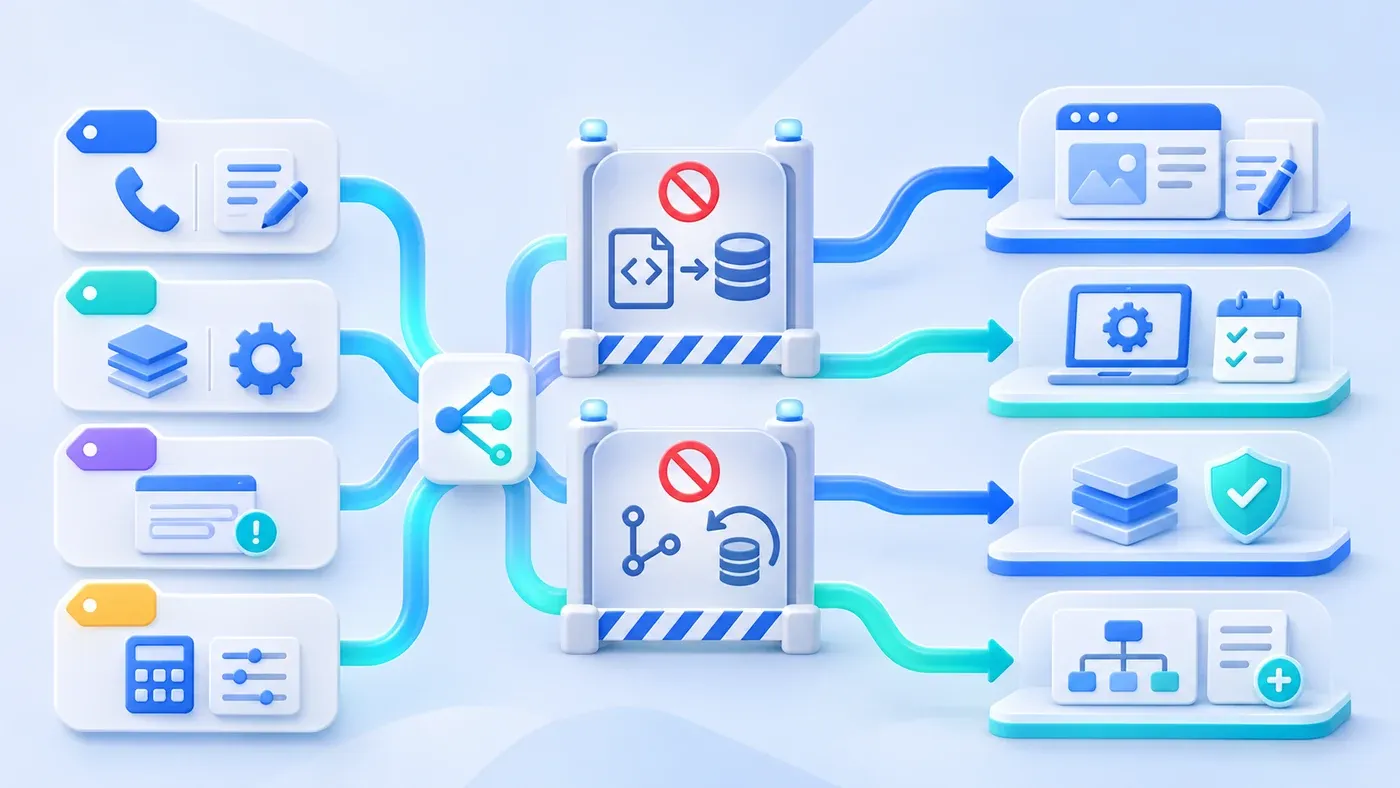
The fastest fix is retiring the catch-all label "website maintenance." Post-launch work separates into four distinct lanes: daily CMS content updates belong to content teams; security patching and monitoring belong to technical operations; regressions on delivered scope are defect fixes; and new page templates or interactive tools require separate change-request scoping. Setting those boundaries at handoff keeps publishing fast and technical effort predictable.
Why Content Updates and Technical Maintenance Get Tangled
Post-launch friction stems from two gaps. First, content and layout code were never decoupled—leaving contact details, service highlights, or labels hardcoded in templates so minor copy tweaks require a code release. Second, agreements promise "annual maintenance" without defining scope: business teams expect any edit to be covered, while developers assume it only covers server uptime and bug fixes.
In a hypothetical scenario, an equipment manufacturer receives four requests in a single week after launching its bilingual site: marketing wants to swap a branch phone number and post two news items; a security alert flags an outdated dependency alongside an expiring SSL certificate; a visitor reports a mobile form error; and sales wants an interactive sizing calculator next week. Putting all four into one support queue guarantees bottlenecks—copy waits on deployments, security waits on features, and new scope triggers billing disputes.
The Four Tiers of Post-Launch Website Maintenance
- Routine content updates
- Technical checks and patches
- Faults in agreed behavior
- New scope and capability
1. Routine Content & CMS Operations (Content / Marketing Teams)
Updates to copy, media, links, or publication flags inside existing templates and structured CMS fields belong to marketing—requiring zero code deploys:
- Collection publishing: Drafting, previewing, and publishing articles, news, and case studies, plus toggling per-language readiness flags.
- Structured page edits: Updating product specs, service scopes, FAQs, and approved visuals within fixed page sections without altering grid or motion rules.
- Global contact settings: Administrator updates to phone numbers, emails, service regions, and official WhatsApp or WeCom links and QR codes.
2. Technical Upkeep & Routine Monitoring (Technical Operations)
Technical maintenance keeps the site secure, observable, and recoverable without altering business copy or adding features:
- Dependency audits and patching: Component vulnerabilities surface continuously after launch. Per the OWASP Vulnerable Dependency Management Cheat Sheet, automated scanners (such as
npm auditor Trivy) detect issues rather than fix them. Engineers must test updates in staging and distinguish compatible minor patches from breaking major upgrades or interim mitigations. - Runtime lifecycle updates: According to the Node.js Releases lifecycle documentation, production apps should run only Active LTS or Maintenance LTS releases (typically providing 30 months of critical bug fixes; historically even-numbered versions through v26 reached LTS while odd versions ended after six months, moving to annual LTS cycles from Node.js 27 onward). Staying on an End-of-Life (EOL) runtime cuts off upstream patches and forces risky emergency upgrades later.
- Certificates, checks, and restore drills: Renewing SSL/TLS certificates before expiry, tracking health endpoints, 4xx/5xx error spikes, and broken links, and running scheduled backup restore drills to prove both the database and uploaded media actually restore into a working site.
3. Defect Fixes Within Delivered Scope (Original Delivery Team)
Defect repair addresses unexpected regressions where previously accepted features fail under normal use—such as form submissions failing to save, mobile cards overlapping on existing templates, broken legacy redirects, or CMS draft save errors.
The baseline is launch acceptance scope: bug fixes restore agreed behavior rather than slipping in redesigns. Bug reports from content teams should include the URL, reproduction steps, browser/device version, and timestamp to distinguish code regressions from recent field edits.
4. New Templates, Features & Integrations (Scoped Change Requests)
Anything modifying template architecture, database schemas, or third-party integrations is new development: interactive calculators, homepage motion redesigns, two-way CRM webhooks, new languages, or multi-step approval flows. Even a "small extra button" impacts responsive grids, bilingual parity, permissions, and regression testing, so it belongs in a scoped estimate and staging acceptance loop aligned with our Delivery Process.
Maintenance Shortcuts That Break Production Sites
Even riskier than unclear contracts are four shortcuts teams take under time pressure:
- Pasting raw HTML or inline scripts into CMS fields instead of updating templates Dropping
<div style="...">or inline<script>blocks into database text fields bypasses responsive breakpoints, contrast standards, and Git review—risking mobile breakage, XSS exposure, and fragile upgrades. - Mistaking database/media restoration for a Git code rollback Git tracks code, templates, and schema definitions—never live articles, inquiry records, or uploaded images. Rolling back Git cannot recover deleted content, and reverting code across a schema change can break the live site. Code rollbacks and database/media restores are separate tools that must match in schema version.
- Editing live files or database rows directly on production Uncommitted SSH hotfixes get wiped on the next deploy and leave staging out of sync with production.
- Disguising new features as support bugs Filing a missing filter or widget as a "bug" encourages quick hacks instead of proper scoping and regression testing.
Post-Launch Responsibility & Boundary Comparison Table
Maintenance Tier | Typical Tasks | Primary Owner | Trigger & Entry | Boundary Red Lines |
|---|---|---|---|---|
Routine Content | Articles, news, specs, FAQs, approved images, WhatsApp/WeCom info, locale readiness | Content Team (Editor drafts; Admin publishes) | Business updates; CMS Admin | No raw HTML/CSS/JS in fields; URL/category changes need redirect review |
Technical Upkeep | Vulnerability scans & staged patches, LTS runtime updates, SSL, log/link checks, restore drills | Technical Ops | Schedule or advisories; staged release | Separate compatible patches from major upgrades; never skip restore drills |
Baseline Bug Fixes | Broken form writes, delivered layout regressions, failed redirects, CMS save errors | Delivery / Support (with repro info) | Deviates from launch baseline; bug triage | Restores agreed baseline only; no unapproved redesigns inside bug tickets |
Feature Changes | Interactive tools, new templates, CRM webhooks, new locales, new workflow roles | Business + Dev Team | New business goal; scoped project | Never hotfix unreviewed code on production; quote and schedule separately |
Post-Launch Website Maintenance & Change Classification Checklist
Attach this checklist to internal handoff records or vendor maintenance agreements:
[Post-Launch Website Maintenance & Change Classification Checklist]

1. Content Operations (Self-Serve in CMS)
- [ ] List collections and page fields marketing edits directly (articles, news, cases, specs, FAQs)
- [ ] Restrict global contact settings (phone, email, WhatsApp/WeCom links, QR codes, notices) to Admins
- [ ] Prohibit raw HTML, inline CSS, or script injection inside CMS fields

2. Technical Routine & Lifecycle Baseline (Technical Ops)
- [ ] Document the supported LTS runtime target (e.g., Node.js LTS) and dependency audit cadence
- [ ] Require all security patches to pass staging verification before production deploy
- [ ] Assign owners for SSL/TLS alerts, health endpoint monitoring, error logs, and broken-link checks
- [ ] Set separate backup schedules for database and uploaded media, plus periodic restore drills
- [ ] Enforce Git-only deployments—keep Git rollbacks separate from data restores and forbid live server edits

3. Defect Triage & Reporting (Delivered Baseline)
- [ ] Restrict defect fixes to regressions from accepted launch functionality, layout, or permissions
- [ ] Require bug tickets to include URL, reproduction steps, browser/device version, timestamp, and screenshot

4. Feature Iteration & Scoping (Separate Projects)
- [ ] Classify new templates, interactive tools, integrations, locales, or workflows as change requests
- [ ] Estimate schema, bilingual parity, testing, and schedule impact before staging acceptance
Separating content operations, technical upkeep, baseline fixes, and new development keeps daily updates moving without sacrificing site stability. When planning your launch handoff or support framework, review our Website Project Preparation Checklist and Corporate Website & Standalone Site Services, or reach out through our consultation page with your maintenance checklist.
