
Key takeaway
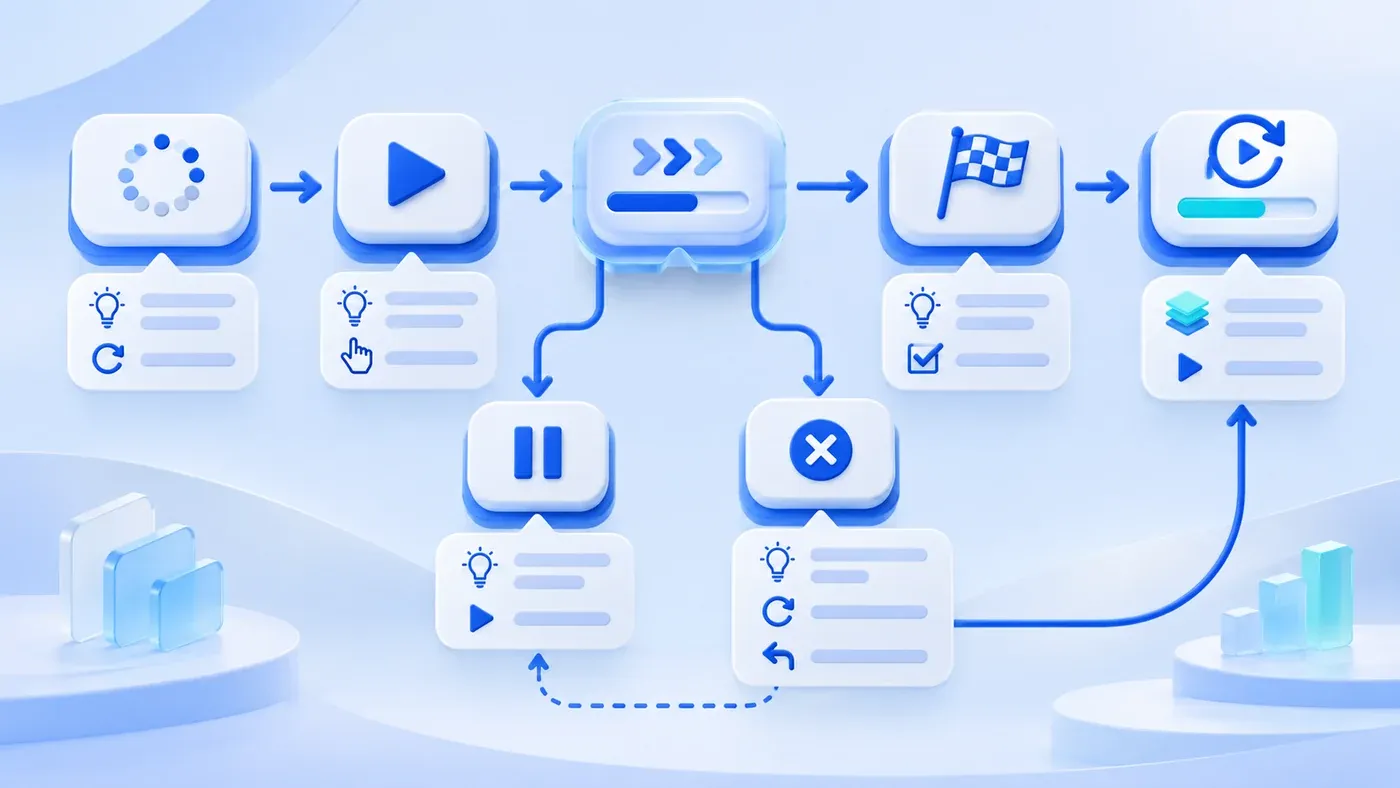
Accept an interactive project by state: loading, start, in-progress, pause, failure, completion, and re-entry. Each state needs a clear message, an available action, and a recovery path. Test backgrounding, network loss, reopening, share links, and repeated entry. Clicking through the demo path once is not acceptance.
The launch story below is a hypothetical example of missed states, not a retrospective of an actual client project.
The interactive page runs smoothly in the demo: open, start, click through, result page. The team accepts it. After launch, real paths differ: someone is interrupted by a call, switches back to WeChat, and the progress is gone; someone loses the network on the subway and watches an endless spinner; someone enters from a share link in the middle of a level and does not know what came before; someone finishes and wants to play again, then gets stuck on the end page.
The demo follows the designed happy path. Delivery acceptance covers states: what users see, what they can do, whether data is saved, and how they return after an interruption.
Accepting only the start screen is not acceptance
"Opens, plays, ends" covers only the main path. An interactive project also has loading, pause, failure, and re-entry states, which are often more common in real use.
Accept like a user who gets interrupted: switch apps, lose the network, lock the screen, close the page, enter from a share link, enter again. Every interruption exposes a state design problem.
Seven states
Loading: resources are being prepared. Users should see the brand, progress, or at least an explicit loading message, not a blank screen.
Start: content is ready and waiting. A clear start button and a short explanation of what will happen and how long it takes.
In progress: the user is participating. Show current progress, allow pause or exit, and give feedback for key actions.
Pause: the user switches apps, locks the screen, or pauses. Save progress and restore on return, or state clearly that it cannot be restored.
Failure: assets fail, the network drops, an API errors. Explain the cause, offer retry, and keep completed parts.
Completion: the user finishes or exits. Show the result, the next step, and a way to participate again.
Re-entry: the user reopens after closing or enters from a share link. Restore progress, start over, or state clearly what state they are in.
Transitions between states
Every state needs a clear exit: a failed load can retry or return; in-progress can pause or exit; completion can replay or share. A state without an exit traps the user.
Transitions need feedback. After tapping Start, the button becomes a loading state; after pausing, a return button is visible; after failure, retry is clickable. Do not make users guess whether the system received the action.
Backgrounding, network loss, closing and reopening
The Page Visibility API reports visibility changes. The app must implement pause and recovery; the API does not guarantee progress survives process eviction.
Backgrounding is the most common interruption. Users take calls, reply to messages, switch apps, and the page may be reclaimed. Progress is saved locally or on the server, or the user is clearly told to start over.
When the network drops, already-loaded content should remain usable, and unfinished uploads or submissions should queue or prompt retry. Do not show a spinner that never ends.
After closing and reopening, restore to the last position if progress was saved; otherwise say it starts over. Do not pretend to restore and then begin at page one.
Direct share links and repeated entry
Share links may carry parameters that enter a level or result directly. Test what happens when parameters are missing or invalid, and whether the user can return to the start or continue.
Test repeated entry too: does the same user's second open continue, restart, or show completed? All three are acceptable if explicit, not random.
Completion and data saving
The end page is part of experience and a data-saving point. Confirm: is the result submitted, is a failure shown, can the user save or share, and does participating again create duplicate records?
If the result needs review or follow-up, state the time and method; do not let users think finishing is the end of the process.
Expected Behavior in Each Interactive State
State | What users see | What they can do | What is saved | Recovery |
|---|---|---|---|---|
Loading | Brand, progress, or loading hint | Wait, return | Not applicable | Failure message and retry |
Start | Explanation and start button | Start, view rules | Not applicable | Retry on asset failure |
In progress | Current progress and action feedback | Continue, pause, exit | Progress and answers | Loaded content kept on network loss |
Pause | Pause notice and return entrance | Continue, exit | Current progress | Restore after backgrounding |
Failure | Failure reason | Retry, return | Completed parts | Retry without duplicate submission |
Completion | Result and next step | Share, replay, close | Final result | Retry if submission failed |
Re-entry | Current progress or restart notice | Continue, restart | Per rules | Explain missing share parameters |
"What is saved" is a project decision. Some interactions need no saving, but pause and reopen must still tell the user.
State messages in plain language, not error codes. "Your progress is saved; continue when you are ready" is more useful than "State restored: 3." Tell the user what happened and what to do next.
Test Entry, Interaction, Interruption and Recovery
[Interactive project state acceptance checklist]

1. State completeness
- Are loading, start, in-progress, pause, failure, completion, and re-entry designed:
- Does each state have a message, available actions, and an exit:
- Do transitions give feedback:

2. Interruptions
- After backgrounding and returning, is progress restored or explained:
- On network loss, is loaded content usable and retry offered:
- After closing and reopening, is state restored or restarted as specified:
- Were lock screen, incoming calls, and system reclamation tested:

3. Entry paths
- Do direct share links work, with missing or invalid parameters explained:
- Does repeated entry continue, restart, or show completed:
- Can a mid-flow entrant return or continue:

4. Completion and data
- Does the end page show results and next steps:
- Are submission failures shown with retry:
- Does replay create duplicate records:
- Is follow-up timing and method explained:
Do not let a developer demonstrate only the happy path. Have three real users each complete one run, deliberately backgrounding, disconnecting, and entering from a share link. Every stuck state gets recorded, fixed, and retested.
The scope of interactive delivery and acceptance can be discussed within content and interactive support.
How content must be restructured per platform is in publishing one piece everywhere is not simple.
Run the state table in WeChat and a browser. For a blocked first screen, also inspect the progressive loading plan.
