
Key takeaway
OCR output is candidate data. Verify each line item, quantity, unit, code, and amount, and check table misalignment, merged cells, and handwriting. Cross-check against the purchase order, supplier catalog, and price history. The confirmation screen shows the scan beside the result and assigns responsibility.
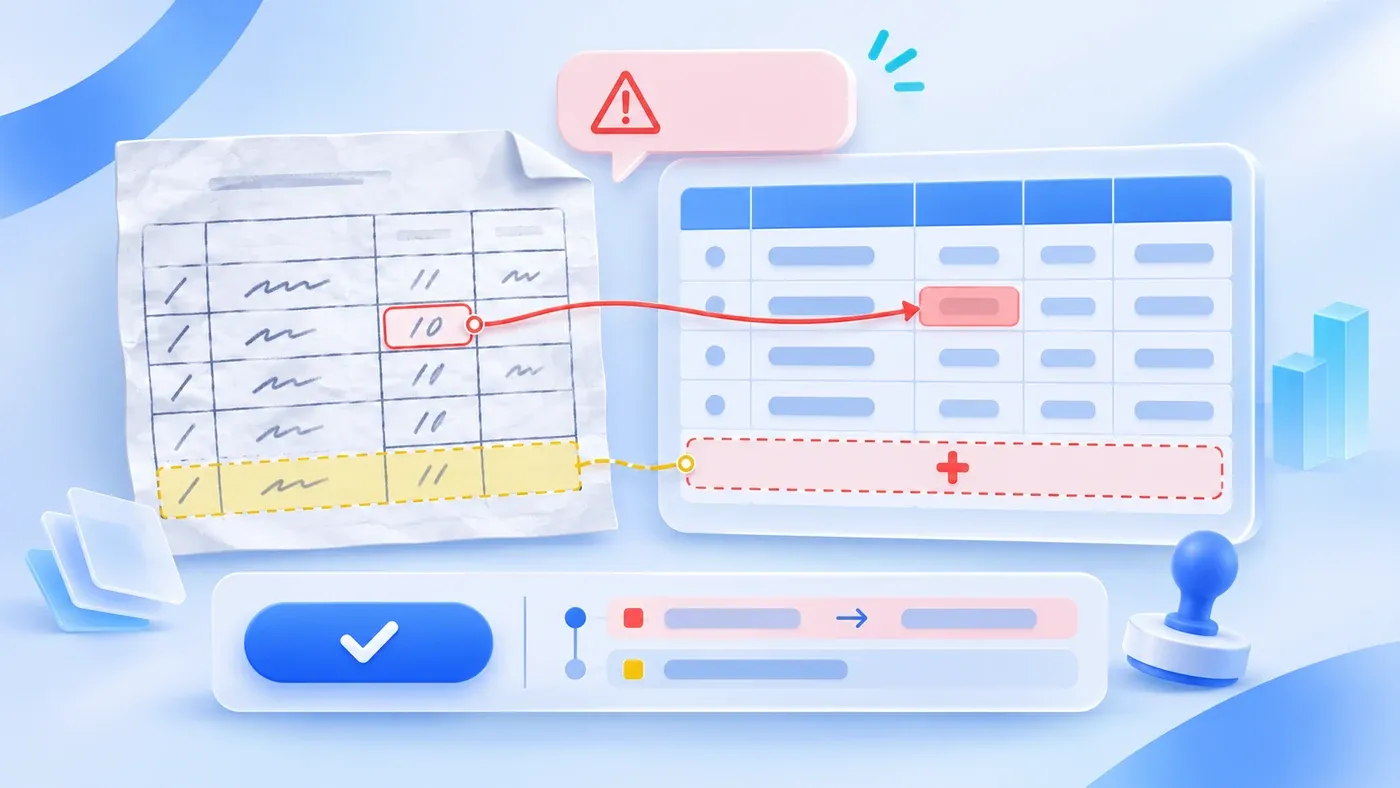
Suppose the following happens. A procurement colleague hands a 12-line scanned purchase order to the system. Recognition completes, the total shows 48,600, matching the total on the scan. Finance checks one line: quantity 10 was read as 100. Further down, another line was not recognized at all. One quantity is ten times too high, one line is missing, and the two errors cancel out in the total.
Scan recognition can cut entry time from twenty minutes to two, but it produces candidate data, not postable results. For a document with tables, handwriting, and multiple units, human confirmation cannot be skipped.
Recognition is not posting
OCR and vision models read text on the page; they do not necessarily understand which field a row belongs to. Missing table lines, merged cells, stamps, and handwritten notes all make text land in the wrong place.
"Recognition complete" means processing finished, not that the result is correct. Posting, payment, and reconciliation should rest on human confirmation.
Layout misalignment: table lines, merged cells, handwriting
Missing or skewed table lines: a slightly tilted scan can shift columns. Unit price lands in the quantity column, amount in the notes column.
Merged cells: a supplier name spanning several rows may be filled only on the first row, leaving the rest empty; or the first value may be copied to every row.
Handwriting: handwritten quantities, signatures, and stamp-side notes usually carry low confidence. Handwritten 10 and 100, or 1 and 7, are common confusions.
Multi-page tables: a second page without a header may be read as a new table, or the continuation relationship is lost.
What these share: the result looks like normal data on its own, and only comparison with the original reveals the problem.
Line items and quantities: the most common errors
Check four things row by row:
- Row count: as many structured rows as detail rows in the original; any extra or missing row needs investigation.
- Quantity and unit pair: is the 10 followed by boxes or pieces? A wrong unit changes the total by a large factor.
- Unit price × quantity = amount: verify each row, not only the grand total.
- Total recomputed from lines: a matching total may be two errors canceling out, as in the 12-line example.
Keep row numbers. The original row, the structured row, and the edit record must correspond so reviewers know which line is meant.
Codes, units, and tax
Material and supplier codes must match master data. When a recognized code is absent, do not create a new record automatically; mark it for confirmation. Watch similar codes: an extra trailing zero, a letter O versus a zero.
Units follow master data. When the original says boxes and the system prices by pieces, confirm the conversion; never assume 1:1.
Keep tax-inclusive and tax-exclusive amounts separate. The unit price on the scan may or may not include tax; preserve the original marking and do not infer on the customer's behalf.
Cross-check against existing data
Run at least three comparisons:
- Against the corresponding purchase order: are lines, quantities, and prices within the order?
- Against the supplier catalog: do name, code, and bank details match master data?
- Against historical prices: is there an unusual jump or a value outside the agreed range?
Cross-checks do not replace reading the original, but they help people find suspect rows quickly. A difference is not necessarily an error; it may be a normal price adjustment or an added item, and a person decides.
Designing the confirmation screen
Show the scan on the left and the structured result on the right; clicking a row highlights the corresponding area on both sides. Mark differing rows with color plus text, such as "quantity differs from the original," never color alone.
Each row can be confirmed or edited individually. Keep the recognized value, the edited value, the editor, and the time. After the whole document is confirmed, record the confirmer, who is accountable for the result rather than "the system misread it" becoming nobody's responsibility.
Before confirmation, the document should not enter payment or posting. The confirmed structure must export with fields aligned to downstream systems.
A hypothetical source comparison
Row | Original | Recognized | Status |
|---|---|---|---|
1 | Code A-001, quantity 10 boxes | Code A-001, quantity 100 boxes | Quantity error, needs confirmation |
2 | Code A-014, quantity 5 pieces | Code A-014, quantity 5 pieces | Match |
3 | Code B-220, quantity 2 sets, unit price 1,200 | Not recognized | Missing line, needs entry |
4 | Code B-221, quantity 8 units | Code B-221, quantity 8, unit "pieces" | Unit mismatch, needs confirmation |
The total may look right in the table while three of four rows have problems. Row-by-row checks and cross-checks both matter; one grand total is not enough.
The same discipline applies to credit notes, delivery notes, and other scanned documents: each has its own fields and its own way of being misread.
Hand Off Each Line Back to the Scan
[Purchase order scan verification checklist]

1. Layout
- Is the scan skewed, missing table lines, or obscured:
- Are merged cells and cross-page tables handled:
- Is handwriting marked separately:

2. Line items
- Do original and structured row counts match:
- Is quantity paired with unit on every line:
- Does unit price × quantity equal the amount:
- Is the total recomputed from lines:

3. Codes and prices
- Do material and supplier codes exist in master data:
- Is the unit conversion confirmed:
- Are tax-inclusive and exclusive values preserved as written:
- Are prices cross-checked against the order or history:

4. Confirmation and trace
- Are original and recognized results shown side by side:
- Do edits keep the old value, editor, and time:
- Does the confirmer sign off, and is posting blocked before that:
Take a scan with handwriting and merged cells, run recognition, and check it against the four groups. If a matching total is enough to pass, the process has not been accepted. Purchase order recognition does not replace financial review and makes no judgment on tax treatment; it turns entry into candidate data for a person to confirm. Specification verification and model distinction are neighboring problems with different objects. The scope of scan recognition and human confirmation workflows can be discussed within AI applications and workflows.
What multimodal AI can do and what still needs human checks is covered in what multimodal AI is. How to grade AI output review is in how AI output should be reviewed.
Check extracted values with the specification review method, and keep failed samples in the assistant acceptance set.
